Before you go, let us know your thoughts!
Thank you for using SwitchboardFREE. We'd like to invite you to leave us a review with an independent 3rd party, Reviews.co.uk.
We use cookies to run our website, analyse its use and personalise ads.
Thank you for using SwitchboardFREE. We'd like to invite you to leave us a review with an independent 3rd party, Reviews.co.uk.
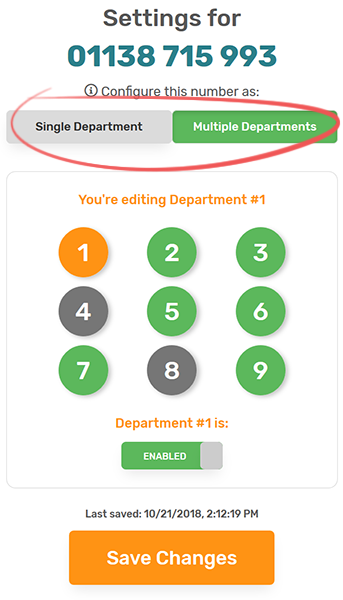
On SwitchboardFREE your number can work in one of two ways, either in "Single Department" mode with one lot of settings or in "Multiple Departments" mode, where each department has its own individual settings.
To select either Single or Multiple Departments, while inside your numbers settings page, click on “Single Department” or “Multiple Departments” button and then click “Save Changes” button to confirm your changes.
In "Multiple Departments" mode callers to your number are provided with a selection of options which you setup to ensure callers are routed to the most appropriate person or department. For example, when callers call your SwitchboardFREE number they might hear the following:
You can configure up to 9 separate departments. Each department has its own independent settings, for example, your Sales department might have different opening times, redirect numbers, different music on-hold, alerts sent to different email addresses etc.
To configure your departments simply click on the department’s number (it’s the keypad on the right hand side… see keypad screenshot) and click the toggle switch to enable it…. And then continue with its individual settings. Always remember to click “Save changes” after you’re done editing your department.
The department number in orange is the one you are currently on, departments numbers in green are enabled and departments in grey and disabled.
Multiple Departments mode is ideal for growing companies or if your workforce is split over different locations or if you simply want to get that "big company feel" even though you might be a small business.
Single Department mode is mostly used by small businesses or one-mans bands and people that do not want to configure more than one department.
A multiple departments setup helps businesses route callers to the right people without manual handoffs. Instead of every call going to one number, callers can self-select sales, support, accounts or bookings, which improves answer rates and reduces the time staff spend redirecting calls internally.
This structure is useful for teams of any size, not just large organisations. Small teams often use departments to create a professional caller journey while still handling calls on mobiles and apps. You can combine this with call redirects, opening hours and music on hold for a polished and consistent call experience.
| Mode | Caller journey | Control | Best for |
|---|---|---|---|
| Single department | One route for all calls | Simple setup | Solo operators and very small teams |
| Multiple departments | Menu-led routing by caller intent | Per-department settings and routing | Growing teams and mixed call types |
You can configure up to 9 departments, each with independent prompts, redirects and timing rules.
Yes. Department settings can include their own routing and scheduling behavior.
Add missed call alerts to reduce response delays and call reporting to track which departments receive the most demand.